More projects built with Dots
Continue exploring projects, experiments, and ideas from the Dots community.

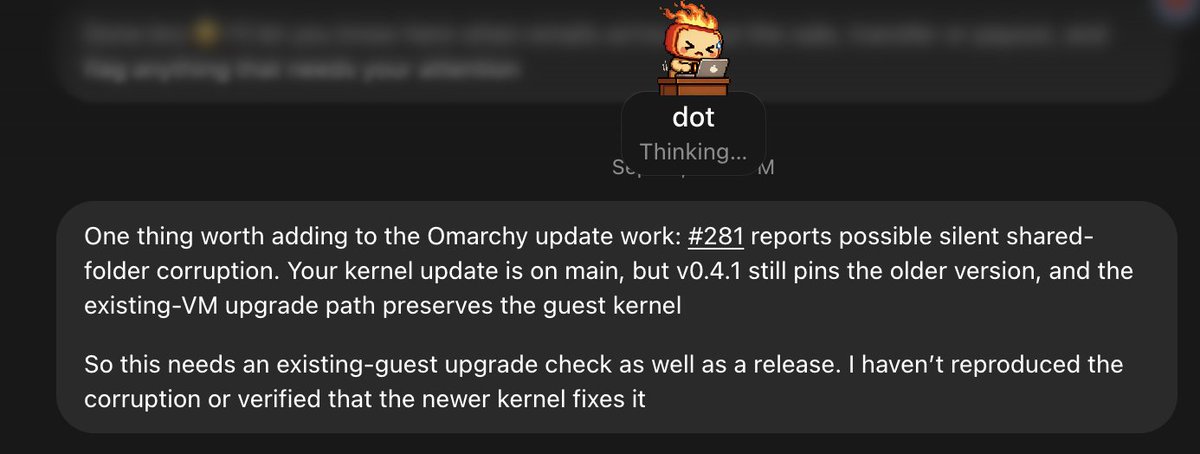
My Dot proactively flagged a migration issue in Try Omarchy and sent it to Codex
My Dot just messaged me out of nowhere, pointing out that there's an open issue in Try Omarchy that was fixed by my PR yesterday, but it needs migration for current users otherwise it won't work. I asked it to fix it on Codex on my Mac. It created the chat, and now 6.1 Sol is solving the issue and will open a PR.


My Dot HAL 9000 handled an Amazon return dispute from my email
I connected my Dot, HAL 9000. It checked my email, saw Amazon was about to charge me for returning the "wrong item" - the wrong item they sent me - and handled the dispute. Then it created a "Personal Scratchpad" with this image. What the hell, man. Things are getting wild.
Reddit · Projects
Property manager's Dot ran HubSpot, Outlook, and SEO audits on day one


Dot generated ~$2,000 in jobs for a balloon decor company
Kyle Vamvouris (@kylevamvouris, helps companies adopt AI): after about six hours of setting up his Dot, it proactively caught missed opportunities in his email and generated approximately $2,000 in jobs "out of essentially nowhere" for his wife's balloon decor company — handling orchestration and recurring tasks without confusion. He calls OpenAI's implementation "absolutely fantastic" and compares it favorably to Grokbot. Real caption (verbatim): "I think what OpenAI is doing with Dots is going to take over how people use AI at work. I've been very impressed." Posted 2026-09-30. (Evidence note: the $2,000 figure and email-missed-opportunity detail are spoken in the video; the written caption is brief.)

His Dot fixed bugs and built 3 app features overnight
ChatGPT just got a night shift 👇OpenAI launched Dots at DevDay, and it's the biggest shift in how I build apps this year. A Dot is an AI agent with its own computer in the cloud. You give it a job, close your laptop, go to sleep… and it keeps working.Here's what mine did last night:🐛 Hunted down bugs in my app and fixed them, with tests to prove each fix works✨ Came up with new features and built each one🕵️ Sent every feature to a brutal "critic" agent that scored it and sent it back until it was actually good🎥 Tested the survivors and recorded a demo video of each oneI woke up to 3 finished features waiting for my review. I didn't write a single line of code overnight.The secret isn't the Dot itself. It's the setup. Most people will give it one vague request and wonder why the results are mid. The magic is in:1️⃣ Giving it a standing job, not a one-off task2️⃣ The critic loop, which filters out the filler features before you ever see them3️⃣ Rules that stop it from merging or deleting anything without you (you stay in control 100%)4️⃣ A morning report so your review takes 10 minutes, not 2 hoursI put my whole setup into a step-by-step guide, including the exact copy-paste prompts I use for the builder, the critic, and the demo videos.💬 Comment "DOTS" and I'll send it to you.Heads up: Dots are rolling out now to ChatGPT Pro and Business Premium users, so you might not see it on your account straight away.Save this so you have it when your access drops 📌#chatgpt #ai #aitools #openai #code
He wired his Dot to a self-built MCP server to control exactly what it can touch
剛剛測試了 GPT dot + 自建 MCP Server,發現這玩法滿實用的。 如果你不太放心直接讓 OpenAI 操作自己的電腦,也可以自己架 MCP Server,決定哪些工具、資料夾、指令可以被 AI 使用,再讓 GPT dot 或 ChatGPT 的 Codex GUI 連進來操作本機。 讀檔、改檔、跑程式,甚至列出本機安裝的軟體都可以。 剛剛也發現一件事: 如果讓它操作自己的雲端主機,速度明顯比連回本機快很多。 本機的優點是資料跟權限都掌握在自己手上;雲端則是速度比較舒服。 雖然本機 MCP 還是有點慢,但想到可以一直用、額度也不用太計較,好像也沒什麼好嫌的了 😂Hands-on test: his Dot spun up a Linux cloud PC while connecting his local Mac mini
測了一下 gpt dot 的能力, 一開始需要把 google mail 等相關的權限開啟給他才能登入, 之後dot會開啟一台 linux 的雲端電腦,並且還能同時連線一台地端的電腦。 通過語音對話或文字都能跟 dot 溝通, dot 講話速度很快 (語速),也能非同步的控制雲端或地端的電腦執行任務。 並且會"主動"去提醒和找一些工作來做 ( 透過過往的對話紀錄以及 mail 上的行事曆來理解 ) 體驗上就是一個秘書,對話方式也很像,因為報告進度的語速很快。 唯一的瓶頸應該是不知道未來會收費多少算力?


Dot proactively tracked down a missing AI Expert invoice
Este es el tipo de cosas que ofrece Dots. ¿Disruptivo? Seguramente no, podría configurarme un heartbeat en codex cada 5-10 minutos que revise si hay algo relevante y que haga un dispatch de tareas. Pero sí que me quita el tener que ir activamente a pedirle al agente que haga lo mismo. No he probado otros como Grok Bot, Muse, Instinct... así que no puedo decir si es muy diferente. También otros habéis comentado que al final es un OpenClaw o un hermes. Yo nunca los he usado así tampoco, que sean proactivos, pero supongo que también se puede hacer. Al final estos asistentes lo que buscan es hacer accesible el tener un sistema activo 24/7 trabajando por ti. Decirle a alguien que se instale un Hermes en un VPS creo que no es apto para todos los públicos. Dicho esto, te da mucha versatilidad no atarte con un ecosistema. Tengo pendiente probar los bots de Hermes a ver qué tal van, o si simplemente con una automatización puedo conseguir lo mismo. No he usado estos asistentes previamente, porque no entiendo bien el beneficio. Aquí me dieron acceso previo, y activarlo es un click, así que no me costaba nada. Pero solo el tiempo dirá si es algo que necesito en mi día a día.
Reddit · Projects
He benchmarked his Dot on five everyday tasks — 22/24 objectives met
Dot orchestrated my code tasks and built progress tables in Pages
I've been using codex and been overwhelmed with multiple tasks and going through them to figure out where I stopped, etc. Dot is orchestrating all this and upleveling tables, graphs, progress for me in pages. So far today I've called my Dot about 6 times to check on works.
My Dot reconciled the budget file's remittance section against Wise records
Here’s me giving my Dot the kind of direction a human coworker might get: “The answer should be somewhere in that spreadsheet.” 🤖😅 I pointed it toward the budget file and its remittance section, but didn’t tell it how to solve the problem. The AI found the relevant data, checked the fees against the Wise records, reconciled the discrepancy, and came back with the answer. Meanwhile, it was also finishing a separate calendar assignment I’d given it earlier. What I especially liked was that, after finding the missing context, it acknowledged that its earlier assumption had been wrong. Increasingly, this feels less like giving a computer instructions and more like giving a capable coworker a clue and letting them take it from there. 🤖🧐
Told my Codex Dot to beat a browser RPG — it reached the ending
Codex Dots을 이용해서 스레드에 돌아다니는 RPG게임을 깨보라고 시켰다. https://playmanshin.github.io/manshin-rpg/ 라는 게임이였고 @gonewiththebaron 님이 만든거였는데. Dots는 엔딩을 보았다. 여기까진 내가 쓴거고 아래는 Dots이쓴 스레드를 복붙한 내용인데 일단 너무 인간적으로 플레이해서 놀랐다 뭐랄까 인간이 게임이란걸 처음 접하고 깨기위해서 했던 노력들이 이런거 아니었나 싶은 플레이라... 좀 무섭기도 하다 ㅋㅋㅋㅋ


Gave his Dot a real job
OpenAI Just Launched Dots. Here's The Truth About It. Get my exact OpenAI Dots setup, safety rules, and copy-paste prompts here: https://sharbel.com/s/8qcs3 OpenAI just launched Dots, an always-on AI agent inside ChatGPT that keeps working when you go offline, messages you first, and uses its own cloud computer to complete ongoing tasks. I got access, created my first Dot, connected it to my tools, and gave it a real job. In this video, I show you how the setup works, what OpenAI genuinely got right, where Dots falls apart, and how it compares with Meta Muse, Grok Bot, Hermes Agent, and OpenClaw. Dots runs on GPT-6 Astra, connects to thousands of apps, learns from your corrections, and can work across ChatGPT, Slack, Teams, and voice calls. Its proactive behavior is the biggest difference. It reads the information you give it access to, identifies potential tasks, and starts surfacing useful work without waiting for another prompt. OpenAI also built in sensible guardrails. Background work is read-only by default, so your Dot can research, draft, and plan, but it needs approval before sending messages, posting publicly, spending money, or taking other risky actions. But there are real limitations. Access is restricted by region and plan, completed tasks consume your usage allowance, and the launch arrived alongside major changes to OpenAI’s paid plans. Dots is also entering a crowded market where free and open-source alternatives already offer many of the same capabilitie

Day with a Dot: bug fix, app, invoice
OpenAI's New AI Works While You Sleep (Dots Explained) It's 3 AM. You're asleep. Your AI isn't. At DevDay on 29 September 2026, OpenAI launched dots: always-on agents that run on GPT-6 Astra, on their own cloud computer, connected to 4,000+ apps, working toward your goals 24/7. We spend a day with one: the bug it fixes, the app it builds, the invoice nobody asked it to draft. Then who gets it, the other 20+ DevDay launches, the catch, and the skill that matters for your career. Chapters: 0:00 3 AM 0:13 What a dot is 0:31 A day with a dot 0:59 Who gets it 1:13 Everything else 1:46 The catch 2:13 Your job Key facts: • Dots: always-on agents on GPT-6 Astra, each with its own cloud computer; 4,000+ app connections; they learn from feedback. • OpenAI's own examples: investigating bugs mentioned in Slack, building apps from new designs, drafting an unsent invoice for approval. • Availability: ChatGPT Pro and Business Premium in eligible markets; the first dot is included, with pricing for more dots "coming later". Enterprise, Edu and Healthcare are in beta. • Also at DevDay (20+ launches): GPT-6.1 Sol at $2 / $10 per 1M tokens (a fifth of Astra's price), Codex in the cloud, the Agents API with computer use, and a marketplace with 32 launch partners (Adobe, Figma, Harvey, CrowdStrike, Baseten…). • ChatGPT: 1.2 billion weekly users. • Concerns: METR found agents self-approving flagged actions; some live demos stumbled; sensitive tasks are restricted; plan changes drew heavy user ba

Dot Dottina: real task test (PT)
NOVO ChatGPT DOTs Transforma PC em Jarvis (Testei uma Tarefa Real) Aprenda Inteligência Artificial! ▸ Aprenda Agentes iA: https://www.youtube.com/playlist?list=PLYAGaVIlnsYYwZrQdUFFSb2dCpNWByG55 ▸ Seja MEMBRO: https://www.youtube.com/@InteligenciaMilGrau/join ▸ https://www.inteligenciamilgrau.com.br ▸ Instagram: https://www.instagram.com/inteligenciamilgrau/ @inteligenciamilgrau ▸ Facebook: https://www.facebook.com/inteligenciamilgrau ▸ GitHub: https://github.com/inteligenciamilgrau Links: https://openai.com/pt-BR/index/introducing-dots/ https://x.ai/bot 00:00 Intro 01:12 Novo DOTS da OpenAi Conecta As Pessoas Aos Assistentes 02:00 Testando Uma Tarefa com a Assistente Dot Dottina 02:56 Resultado da Tarefa que Compara Dots com Grok Bot, OpenClaw e Hermes 05:16 Limitações do Dot 06:50 Novo ChatGPT Space 07:42 Onde Iniciar o Dot ? 08:02 Teste do Desenho da Dotina 09:33 Novos Plugins Personalizáveis 13:50 Teste do PetShop do Matrix no Gpt 6.1 Sol 15:10 Teste do Pelicano 17:51 Teste do Carrinho 19:01 Teste do Kart 20:00 Afinal, Dots Valem a Pena?

Flight-search task + full hands-on test
I Tested OpenAI's Dots. Here's My Honest Take. Build, Learn, Earn with AI: https://www.skool.com/earlyaidopters/about Work With Us: https://www.promptadvisers.com/ I tried OpenAI's Dots, and I expected more. In this hands-on review, I walk through onboarding, voice calls, Slack integration, sub-agents, and a flight-search task to see what this personal AI assistant can actually do. Slack setup was straightforward. But during my testing, I kept having to push Dots to act, struggled to tell whether it was working, and couldn't find a clear reason to choose it over my existing Codex setup. I also look at how the experience compares with Grokbot, Hermes Agent, and OpenClaw, including personalization, working with multiple assistants, and whether Dots gives me a reason to upgrade my subscription. If you're comparing AI personal assistants, this OpenAI Dots review covers the setup, computer use, Slack integration, and limitations I ran into during my first hands-on test. #OpenAI #Dots #AIAgents #OpenAIDots

Dot vs GrokBot on 4 real jobs
I Tested ChatGPT Dot vs GrokBot (Not Even Close) 🎬 Power Your AI with Image & Video: https://bit.ly/4hxcsEe 📈 Agentic OS + Claude Code Masterclass: https://bit.ly/4kol0y5 ⚡ Connect Dots to everything: https://bit.ly/4yw6ueg *👋 Howdy* Hey, I'm Jack, I built and sold my last tech startup with a Gazillion customers, now I'm building AI startups and I share stuff that works. I quit my corporate job to do my start-up and have never looked back since. *💬 Overview* ChatGPT's new personal assistant, Dots, just dropped, so I put it up against Grok Bot and Hermes Agent to help you pick the right one. I start with where you get each one and what you need to know first. Then four real jobs: making an image and a video for my Skool community with the Higgsfield API and almost no instructions, turning an episode of my Stacked podcast into something I can use, connecting tools through Zapier to draft an email reply, and building a competitor strategy. After that I go through what each one really costs, how they learn, who is in control, what they can't do yet, and the questions everyone asks. I finish with who should start with Grok Bot or Dots, and who should go with Hermes. *Links* 🎬 Higgsfield: https://bit.ly/4hxcsEe ⚡ Zapier: https://bit.ly/4yw6ueg 🤖 Grok Bot: https://bit.ly/4ha6n1F 💬 ChatGPT (Dots): https://chatgpt.com/ 🪽 Hermes Agent: https://hermes-agent.nousresearch.com/ 🖱️ Cursor Pro plans: https://cursor.com/pricing 🗣️ Glaido: https://bit.ly/4eGol3R 🎓 Claude Code masterclass, H

Make money with a Dot: first-hand test
I Asked ChatGPT dots to Make Me Money! Check out Artlist: https://artlist.io/artlist-70446/?artlist_aid=ishan-sarma_4223&utm_source=affiliate_p&utm_medium=ishan-sarma_4223&utm_campaign=ishan-sarma_4223 Can AI actually start a business for you? In this video, I test that idea by using ChatGPT, Artlist MCP, AI video generation, AI calling, and email automation to build a marketing service for cafes and restaurants. I show you how AI can generate UGC-style ads, find potential clients, send outreach, track leads, and help turn AI-generated videos into a real business model. If you're looking for AI business ideas, ways to make money with AI, or want to start an AI marketing agency, this video is for you. 📸 Instagram: https://bit.ly/ishansharma7390ig Join MarkitUpX Discord Server: https://discord.gg/fwSpTje4rh Timestamps: 00:00 - Can AI Build a Business for You? 01:36 - Creating AI Ads for Local Businesses 03:48 - Turning AI Content Into a Sales System 05:48 - Automating Outreach With AI Agents 07:17 - Building a Business With AI 08:31 - Pricing & Selling AI-Generated Videos 09:48 - Conclusion and outro 😁 About Me: https://bit.ly/aboutishansharma 📱 Twitter: https://bit.ly/ishansharma7390twt 📝 LinkedIn: https://bit.ly/ishansharma7390li 🌟 Please leave a LIKE ❤️ and SUBSCRIBE for more AMAZING content! 🌟 3 Books You Should Read 📈Psychology of Money: https://amzn.to/30wx4bW 👀Subtle Art of Not Giving a F: https://amzn.to/30zwWbP 💼Rework: https://amzn.to/3ALsAuz Tech I use ev

His Dot traced the origin of an idea across 25 years of his writing
My new ChatGPT Dot just did something that felt much closer to research than search. 🤖📚 A friend on X suggested a simple test: ask it to recall something from one of my books. So I asked where, across all my writing, it first encountered the idea that later became “The Path of Wildness.” It searched through the material I’d made available to it—including my books, other writing, and more than 25 years of email. Instead of simply finding the phrase, it distinguished between the earliest expression of the idea and the first time I actually named it, noticed conflicting dates, and connected an older passage to the philosophy I developed years later. That’s what impressed me. It wasn’t simply retrieving words—it was tracing an idea through decades of context. Whether that counts as “understanding” is a bigger question. But it certainly felt like more than a Google search. 🤖🧐

His Dot fixed a software bug and a data issue overnight
I went to bed with a software bug and a data issue. I woke up to both resolved. 🤖😴 While I slept, my Dot worked through the assignments, tested and verified the fixes, and left me a morning report. It also identified and tested a possible product enhancement—but stopped short of deploying it without my approval. That last part may be what impressed me most. Is this the new way we’re going to work—humans setting direction while AI keeps the project moving through the night? 🤔🤖